


.png?width=18&height=18&name=Vector%20(5).png)




Your sales calls hold the answers to why deals close or stall, but most of that insight disappears the moment someone hangs up. Cirrus Insight captures every conversation and connects it directly to your Salesforce workflow, turning raw call data into actionable next steps. If you're searching for conversation intelligence tools that do more than record and transcribe, this guide breaks down the platforms built for CRM-focused sales teams.
We've evaluated eight conversation intelligence platforms based on CRM integration depth, AI coaching capabilities, and how well they fit into existing sales workflows. You'll find detailed reviews, a comparison table, and practical guidance to help you choose the right tool for your revenue operations.
Quick Guide: 8 Best Conversation Intelligence Tools for Sales Teams
- Cirrus Insight: The best full-cycle AI platform for Salesforce-native email and call analytics
- Gong: A conversation analytics tool with post-call revenue reporting features
- Avoma: An AI meeting assistant with automated note-taking and call scoring
- Chorus: Call recording and analysis bundled with ZoomInfo's data ecosystem
- Revenue.io: Real-time call guidance paired with outbound dialing workflows
- Wingman: Live deal alerts and playbook prompts during active sales calls
- Salesloft: Sales engagement cadences with embedded call transcription features
- Outreach: Multi-channel sequencing that includes call recording and analytics
How We Chose The Best Conversation Intelligence Tools for Sales Teams
Sales and RevOps leaders need more than call recordings—they need insights that connect directly to pipeline movement and rep performance. We focused on platforms that turn conversation data into measurable improvements in quota attainment.
- CRM integration depth: Does the tool sync automatically with your existing CRM, or does it require manual data entry? Native Salesforce integration matters when you're managing hundreds of opportunities.
- Full-cycle AI coverage: We looked for platforms that assist before, during, and after calls—not just post-call analysis. Pre-meeting briefings and live coaching separate the top-tier tools from basic recorders.
- Email and call analytics in one place: Many deals progress through email before a single call happens. The best platforms track both channels and connect them to the same opportunity record.
- Coaching and enablement features: Can managers quickly identify coachable moments? We evaluated how each platform surfaces talk patterns, objection handling, and skill gaps.
- Implementation and adoption: A tool only drives ROI if your team uses it. We considered setup complexity, onboarding resources, and how naturally each platform fits into daily workflows.
- Scalability for mid-sized teams: Enterprise-only platforms often miss the mark for 50-250 person sales organizations. We prioritized tools that scale without requiring dedicated RevOps headcount.
The 8 Best Conversation Intelligence Tools for CRM Sales
1. Cirrus Insight: Best overall conversation intelligence tool for Salesforce sales teams
Cirrus Insight delivers AI that works before, during, and after every sales meeting—a distinct advantage for revenue teams who've grown tired of platforms that only analyze calls after the fact. While most conversation intelligence tools require you to review dashboards separately from your CRM, Cirrus Insight brings meeting prep, live coaching, and automatic Salesforce updates directly into your Gmail or Outlook inbox.
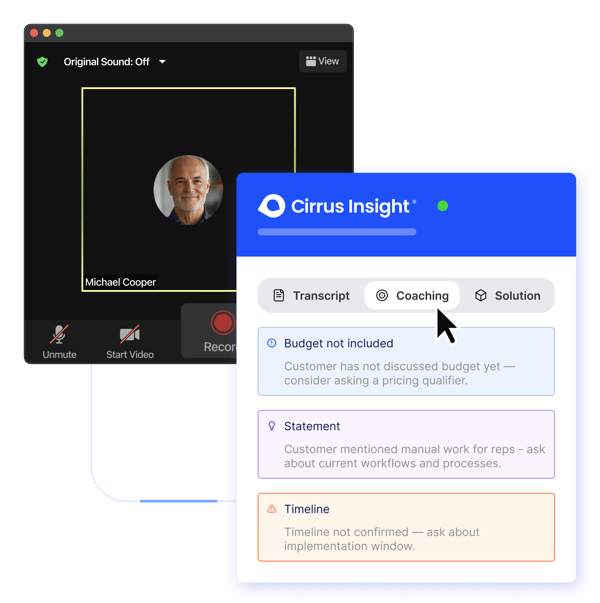
The platform's Meeting AI feature automatically delivers pre-call briefings with contact history, recent activities, and relevant opportunity details. During calls, reps receive real-time coaching prompts to handle objections and identify buying signals. After the meeting ends, Cirrus Insight transcribes the conversation, extracts action items, and syncs everything back to Salesforce—no manual data entry required.
For Sales Managers and Revenue Operations leaders, this full-cycle approach means reps spend less time switching between tools and more time having meaningful conversations. According to research from Salesforce, sales reps spend only 28% of their week actually selling. Cirrus Insight addresses this by automating the administrative work that eats into productive selling time.
Cirrus Insight features
- Meeting AI briefings: Automatically compiles contact insights, recent email threads, and opportunity context so you walk into every call prepared.
- Live coaching and next-step recommendations: Receive in-call guidance on objection handling and follow-up priorities based on conversation flow.
- Automatic Salesforce sync: Emails, calendar events, call transcripts, and tasks sync to your CRM without requiring manual logging from reps.
- Buyer Signals tracking: Know exactly when prospects open emails, click links, or engage with attachments—then act on that intelligence.
- Retro Coaching for managers: Review call recordings with AI-generated insights that highlight coaching opportunities and rep skill gaps.
- Native Gmail and Outlook integration: Access Salesforce data and conversation intelligence directly from your inbox, not a separate dashboard.
Cirrus Insight pros and cons
Pros:
- Full-cycle AI that assists before, during, and after meetings—not just post-call analysis
- Native Salesforce integration with support for custom objects and real-time activity sync
- Combines email tracking, calendar scheduling, and conversation intelligence in one platform
Cons:
- Designed specifically for Salesforce users, so teams using other CRMs will need to evaluate compatibility
- Advanced AI coaching features require time to configure for your specific sales methodology
- Smaller teams may not immediately use all available features at launch

2. Gong: Revenue analytics with conversation recording capabilities
Gong has built its reputation on analyzing sales calls and surfacing patterns across large deal volumes. The platform records customer interactions, transcribes them, and uses AI to identify trends in talk ratios, competitor mentions, and objection handling.
Revenue teams use Gong primarily for post-call analysis and sales coaching. The platform excels at showing managers which conversation patterns correlate with closed deals, making it useful for identifying and replicating high-performer behaviors.
Gong features
- Conversation analytics: Tracks talk-to-listen ratios, question frequency, and topic trends across recorded calls.
- Deal intelligence dashboards: Surfaces at-risk opportunities based on engagement patterns and conversation signals.
- Searchable call library: Find specific moments across your entire call history using keyword and topic search.
Gong pros and cons
Pros:
- Offers detailed conversation analytics for coaching and performance review
- Integrates with major CRM platforms and sales engagement tools
- Aggregates market intelligence from customer conversations
Cons:
- Focuses primarily on post-call analysis rather than pre-meeting prep or live coaching
- Requires a separate CRM to manage pipeline data and opportunity records
- Implementation timelines can extend several weeks for larger organizations
3. Avoma: AI meeting assistant with call scoring automation
Avoma positions itself as an all-in-one meeting intelligence platform that automates note-taking, generates call summaries, and scores conversations based on configurable criteria. The tool appeals to teams looking for meeting productivity features alongside conversation analysis.
The platform records meetings across video conferencing platforms, transcribes them in real-time, and generates AI-powered notes that can sync to your CRM. Avoma also includes a scheduling feature and lead routing capabilities.
Avoma features
- AI-generated notes and summaries: Automatically creates meeting recaps with action items and key discussion points.
- Custom AI scorecards: Configure scoring criteria based on your sales methodology to evaluate call performance.
- Scheduler and lead router: Book meetings and route inbound leads based on configurable rules.
Avoma pros and cons
Pros:
- Combines meeting scheduling with conversation intelligence in one subscription
- Offers a free trial period for teams to evaluate core features
- Supports transcription in multiple languages for global sales teams
Cons:
- CRM integrations may require additional configuration for custom field mapping
- Revenue intelligence features are available as add-ons rather than core functionality
- Less focused on deep Salesforce-native workflows compared to purpose-built alternatives
4. Chorus: Conversation recording within ZoomInfo's data ecosystem
Chorus, now part of ZoomInfo, offers call recording and analysis integrated with ZoomInfo's B2B contact and intent data. The platform focuses on helping sales teams understand customer sentiment and conversation patterns across their deal cycle.
Teams already using ZoomInfo for prospecting may find value in the data connectivity between the platforms. Chorus captures calls and meetings, transcribes them, and allows managers to tag and share key moments for coaching.
Chorus features
- Sentiment analysis: Identifies emotional cues and engagement levels throughout recorded conversations.
- Call snippet sharing: Managers can tag and distribute specific call moments for team training.
- ZoomInfo data integration: Connects conversation insights with contact and account intelligence.
Chorus pros and cons
Pros:
- Integrates with ZoomInfo's prospecting data for enhanced account context
- Offers call libraries that support onboarding and rep development
- Includes talk pattern analytics for coaching conversations
Cons:
- Requires ZoomInfo subscription to access full platform value
- Forecasting and pipeline analytics are less developed than dedicated revenue intelligence tools
- Limited real-time coaching capabilities during live calls
5. Revenue.io: Real-time call guidance for outbound sales teams
Revenue.io focuses on guided selling during live calls, combining conversation intelligence with dialing infrastructure. The platform delivers real-time prompts and objection handling suggestions while reps are actively engaged with prospects.
Outbound-heavy organizations appreciate the platform's power dialer capabilities alongside its analytics. Revenue.io records calls, delivers AI recommendations, and surfaces coaching opportunities based on conversation patterns.
Revenue.io features
- Real-time call guidance: Displays contextual prompts and talking points during active conversations.
- Power dialer integration: Combines high-volume outbound dialing with conversation capture.
- Coaching dashboards: Identifies trends and skill gaps across your team's call activity.
Revenue.io pros and cons
Pros:
- Delivers live coaching prompts during calls rather than only post-call analysis
- Includes dialing infrastructure for teams managing outbound campaigns
- Offers Salesforce integration for activity logging
Cons:
- Platform is oriented toward phone-heavy sales motions rather than video meetings
- May overlap with existing dialer investments for some organizations
- Email analytics and calendar sync are less developed than full-stack alternatives
6. Wingman: Live deal alerts during sales conversations
Wingman delivers real-time intelligence during calls by surfacing playbook prompts, competitor battlecards, and deal alerts as conversations unfold. The platform records meetings across conferencing tools and delivers post-call summaries with AI-generated action items.
Sales teams use Wingman to ensure reps follow established talk tracks and handle objections consistently. The tool integrates with CRM platforms to log activities and associate call recordings with opportunity records.
Wingman features
- Live battlecards: Surfaces competitive intelligence and objection responses during active calls.
- Deal alerts: Notifies reps when conversations indicate deal risk or advancement signals.
- AI call summaries: Generates meeting recaps with key topics and follow-up recommendations.
Wingman pros and cons
Pros:
- Delivers in-call prompts that help reps follow playbooks in real time
- Offers deal intelligence signals based on conversation content
- Includes CRM integrations for activity logging
Cons:
- Focused primarily on meeting intelligence rather than full sales workflow automation
- Email tracking and calendar sync require additional tools
- Smaller vendor compared to established conversation intelligence platforms
7. Salesloft: Sales engagement with embedded call recording
Salesloft operates as a sales engagement platform that includes call recording and transcription as part of its broader cadence and workflow capabilities. Teams use Salesloft primarily for multi-channel outreach sequencing, with conversation intelligence as an added layer.
The platform captures calls made through its dialer and delivers analytics on call outcomes, talk time, and engagement patterns. Salesloft integrates with CRM platforms to sync activities and maintain pipeline visibility.
Salesloft features
- Multi-channel cadences: Automate email, call, and social touchpoints in coordinated sequences.
- Call recording and transcription: Capture and review calls made through the Salesloft dialer.
- Pipeline visibility: Track deal progression and engagement metrics across your team.
Salesloft pros and cons
Pros:
- Combines sales engagement workflows with call recording in one platform
- Offers cadence automation for coordinated multi-channel outreach
- Integrates with Salesforce and other major CRM platforms
Cons:
- Conversation intelligence is a secondary feature rather than core functionality
- Call analytics depth is more limited than dedicated conversation intelligence tools
- Teams primarily running inbound motions may not use engagement features
8. Outreach: Sequencing platform with conversation capture
Outreach focuses on sales engagement and pipeline management, with call recording and analysis included as part of its platform. Teams use Outreach primarily for automated outreach sequences, deal tracking, and activity coordination.
The platform records calls and meetings, generates summaries, and delivers analytics on conversation outcomes. Outreach integrates with CRM systems to maintain opportunity records and track rep performance.
Outreach features
- Sequence automation: Build and manage multi-step outreach campaigns across channels.
- Meeting recording and summaries: Capture video and phone calls with AI-generated recaps.
- Deal management views: Track opportunities and engagement across your pipeline.
Outreach pros and cons
Pros:
- Offers end-to-end sales engagement with conversation capture included
- Delivers pipeline and deal management alongside activity tracking
- Includes forecasting features for revenue teams
Cons:
- Conversation intelligence features are not as advanced as purpose-built alternatives
- Platform complexity may exceed needs for teams focused primarily on call analysis
- Full feature access typically requires higher-tier subscriptions
Comparison table: The best conversation intelligence tools for sales
| Platform | Pre-Meeting AI Prep | Live In-Call Coaching | Native Salesforce Sync | Email + Call Analytics |
|---|---|---|---|---|
| Cirrus Insight | ✓ | ✓ | ✓ | ✓ |
| Gong | ✗ | ✗ | Via integration | ✓ |
| Avoma | ✗ | ✓ | Via integration | ✗ |
| Chorus | ✗ | ✗ | Via integration | ✗ |
| Revenue.io | ✗ | ✓ | Via integration | ✗ |
| Wingman | ✗ | ✓ | Via integration | ✗ |
| Salesloft | ✗ | ✗ | Via integration | ✓ |
| Outreach | ✗ | ✗ | Via integration | ✓ |
What Should You Look for in Conversation Intelligence Software?
The conversation intelligence market has expanded rapidly, with dozens of vendors now claiming AI-powered sales insights. However, not all platforms deliver equal value for CRM-focused sales teams. When evaluating options, focus on how well each tool connects conversation data to your actual selling workflow.
Start by assessing CRM integration depth. A platform that records calls but requires manual data entry defeats the purpose of automation. Look for tools that sync transcripts, action items, and engagement signals directly to opportunity records without requiring reps to switch contexts.
Next, consider when the AI assistance actually helps. Post-call analysis has value for coaching and trend identification, but it doesn't help reps during the moments that matter most—live conversations with prospects. Tools that deliver pre-meeting briefings and in-call coaching create more immediate impact on deal outcomes.
Finally, evaluate total workflow coverage. Many teams cobble together separate tools for email tracking, calendar scheduling, call recording, and CRM updates. Platforms that unify these functions reduce tool sprawl and improve adoption rates across your sales organization.
How Does Conversation Intelligence Improve Sales Performance?
Conversation intelligence moves sales coaching from subjective opinion to data-driven feedback. Instead of managers relying on ride-alongs or self-reported call summaries, they gain visibility into every customer interaction—with AI highlighting the moments that matter most.
For individual reps, this means faster skill development. Rather than waiting for quarterly reviews, reps can see exactly how their talk patterns, question frequency, and objection handling compare to top performers. This feedback loop accelerates ramp time for new hires and helps experienced sellers refine their approach.
At the pipeline level, conversation intelligence surfaces deal risks that might otherwise go unnoticed. When a champion goes silent or competitive mentions increase, AI can flag these signals before opportunities stall. Revenue teams using AI-powered pipeline management report up to 30% improvement in conversion rates, according to industry research.
Why Cirrus Insight is the Best Conversation Intelligence Tool for CRM Sales
Cirrus Insight stands apart because it addresses the complete sales workflow—not just call recording. While other platforms analyze conversations after they end, Cirrus Insight prepares your reps before meetings start, guides them during live calls, and automates follow-up actions once conversations conclude.
This full-cycle approach matters because deal momentum depends on what happens between calls as much as during them. When Meeting AI delivers contact insights and opportunity context before a call, reps walk in prepared. When live coaching surfaces objection responses during the conversation, reps handle challenges confidently. When Salesforce sync captures everything automatically afterward, nothing falls through the cracks.
For Salesforce-native organizations, the integration depth is particularly valuable. Cirrus Insight supports custom objects, real-time activity sync, and automatic logging of emails, meetings, and tasks. Your team gets conversation intelligence that actually connects to pipeline data—not just another dashboard requiring manual reconciliation.
If you're ready to see how AI that works before, during, and after every meeting can improve your team's performance, schedule a demo with Cirrus Insight and experience the difference for yourself.
FAQs about conversation intelligence tools for CRM sales
What is conversation intelligence software?
Conversation intelligence software records, transcribes, and analyzes sales calls and meetings using AI. These tools surface insights like talk patterns, objection handling, and buyer sentiment to help sales teams improve their performance. Cirrus Insight takes this further by delivering AI assistance before, during, and after conversations—not just post-call analysis.
How does conversation intelligence integrate with Salesforce?
Integration approaches vary significantly across platforms. Some tools require manual data export or third-party connectors, while others offer native sync capabilities. Cirrus Insight connects directly to Salesforce, automatically logging transcripts, action items, and engagement signals to opportunity records without requiring reps to switch between applications.
Can conversation intelligence help with sales coaching?
Yes—conversation intelligence gives managers visibility into every customer interaction, making coaching more targeted and data-driven. Cirrus Insight's Retro Coaching feature highlights coachable moments from recorded calls, helping managers identify skill gaps and replicate high-performer behaviors across their teams.
What's the difference between conversation intelligence and revenue intelligence?
Conversation intelligence focuses specifically on analyzing customer interactions—calls, meetings, and sometimes emails. Revenue intelligence is a broader category that includes pipeline analytics, forecasting, and deal tracking alongside conversation data. Cirrus Insight combines both by connecting conversation insights directly to Salesforce opportunity records.
Which conversation intelligence tool works best for mid-sized sales teams?
Mid-sized teams typically need platforms that scale without requiring dedicated RevOps headcount. Cirrus Insight fits this profile by offering native Salesforce integration, inbox-based workflows, and AI features that work without extensive configuration. The platform grows with your team while maintaining straightforward adoption.


