


.png?width=18&height=18&name=Vector%20(5).png)



November 2025 Release Notes
November 14th, 2025
Overview
Summary
This week’s Enhancements deliver several improvements across scheduling, admin tools, syncing, and the sidebar. The Scheduling feature now properly supports ampersands (&) in input fields, preventing broken URLs caused by incorrect HTML conversion. The Dashboard update making the “Copy Booking Link” icon beside the avatar bar is now generally available to all organizations, ensuring quick access to the user’s primary booking link. In the Admin Dashboard, a new checkbox option on the User CSV Import page lets admins choose whether to send activation emails during user creation, aligning it with other user creation methods. The Sidebar received multiple updates: the “Edit Filed Event” button now respects admin settings by hiding when editing permissions are disabled, and email filing to Tasks now records attachment names in Salesforce for better visibility. Finally, Email and Calendar Sync was enhanced with alias support and duplicate prevention, ensuring that synced emails and events are correctly mapped to the right Salesforce records, even for users with multiple email aliases.
Under Fixes, a rare issue affecting Gmail users was resolved — previously, the Sidebar would occasionally fail to appear when clicking the Cirrus Insight icon. This has been fixed to ensure the sidebar consistently loads as expected.
✨ Enhancements- When adding & to any input field on a Meeting Type or Calendar View, the system was converting the & to & which would result in broken URLs.
An update was made to ensure the HTML sanitizer doesn’t convert that character incorrectly.
- A recently added update that adds a calendar icon to the left of the avatar enabling the ability to copy their primary booking link was enabled up for existing customers and trials.
The feature has now been updated so it’s available for all current and future orgs.
- The CSV Import feature on the Users page did not originally support the “Send user activation email” option like the other user creation options so admins were unable to control if and when users receive the activation email when their account is created.
A checkbox option was added to the CSV Import page that is unchecked by default, matching the behavior of this option on the other user creation pages.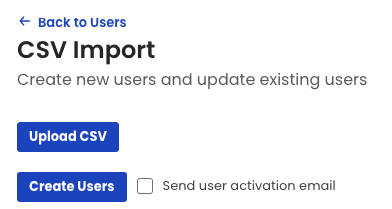
- In cases where an org hides the “Edit Object” option in the Sidebar Action Items of the admin dashboard, we were only hiding the related icon in the action menu of the object card, but still showing the button to edit the object at the top of the sidebar. This created a situation where users could still edit objects when the org has intentionally disabled this ability.
An update was made so when the Edit Object option is hidden in the admin dashboard, we will also hide the Edit button at the top of the sidebar.
- In some scenarios a sync user can have more than one email address in the form of an alias that’s tied to their email account. As a result emails and meetings would sometimes sync to the wrong object in Salesforce or fail to sync entirely.
An update was made to log the aliases for each user as they are detected to ensure we correctly map the synced email and events to the correct record in Salesforce.
- When filing an email to a task and selecting attachments to file in the process, the Sidebar would not mention the name of the selected attachments on the task in Salesforce, making it seem like the attachments weren’t filed during this process.
An update was made to email filing so the names of any selected attachments are appended at the end of the task in Salesforce.
🛠 Fixes
- In rare circumstances the sidebar would not appear for Gmail users when the Cirrus Insight icon is clicked.
A fix was implemented that prevents this issue from happening in the future.
November 7th, 2025
Overview
Summary
🛠 Fixes
- When other third party Gmail extensions are installed, they can open when the Cirrus Insight icon is clicked from the app blade.
A fix was implemented to ensure that the Cirrus sidebar opens when the icon is clicked regardless of other third party apps being installed.
- Google made a change to their Gmail app that changes how it presents message IDs, which are used to match signal data between the email thread and the signals we’re capturing into the database.
An update was made to the sidebar to capture the message ID and work around Google’s change to Gmail.
- When an email recipient and sender belong to same org then Replies are tracked for one recipient only. A fix was implemented to ensure that reply tracking works as expected.
- When changing the time zone while viewing the week view, the days on the calendar would shift incorrectly and display the wrong day of the week.
A fix was implemented to ensure that the days and dates correctly align when the time zone is changed.


