


.png?width=18&height=18&name=Vector%20(5).png)




Sales reps spend an average of just 28% of their time actually selling. The rest gets swallowed by administrative tasks, manual data entry, and—perhaps most frustrating of all—meeting preparation. According to Gartner research, AI-powered sales technologies can reduce time spent on prospecting and customer meeting prep by over 50%.
If you're a sales or operations leader looking to reclaim those lost hours, Cirrus Insight offers a unified approach to salesforce meeting scheduling and automated meeting prep that connects your email, calendar, and CRM into one streamlined workflow.
This guide walks you through how to set up automated inbound lead scheduling and pre-meeting briefings in Salesforce—step by step.
Why Automating Sales Meeting Prep Matters
Before diving into the how-to, let's look at why this matters for your team. According to McKinsey, companies using AI to decrease meeting preparation time see meaningful improvements in sales productivity and pipeline velocity.
Manual meeting prep typically involves:
- Searching through Salesforce records for contact history
- Reviewing past email threads and call notes
- Researching the prospect's company and recent news
- Identifying open opportunities and deal status
This process can take 15-30 minutes per meeting. Multiply that across a full sales team's daily calendar, and you're looking at significant lost selling time.
For more detail, explore our meeting minutes guide.
Step 1: Connect Your Email and Calendar to Salesforce
The foundation of any automated meeting workflow is a reliable sync between your email, calendar, and Salesforce. Without this connection, you're working with fragmented data.
Cirrus Insight's Salesforce Sync automatically captures emails, calendar events, and tasks and logs them to the appropriate Salesforce records. This means every interaction is tracked without reps needing to manually update the CRM.
What to Configure
- Email sync: Set up bi-directional sync so emails sent and received are automatically associated with Salesforce contacts and opportunities
- Calendar sync: Connect your Google or Outlook calendar to ensure meetings appear on relevant Salesforce records
- Activity tracking: Enable automatic logging of email opens, link clicks, and attachment views
This creates the data foundation that makes automated meeting prep possible. Your pre-meeting briefings are only as good as the activity data feeding them.
Step 2: Set Up Automated Inbound Lead Scheduling
When a lead fills out a form on your website, time matters. Research shows that responding within five minutes can double your conversion rates.
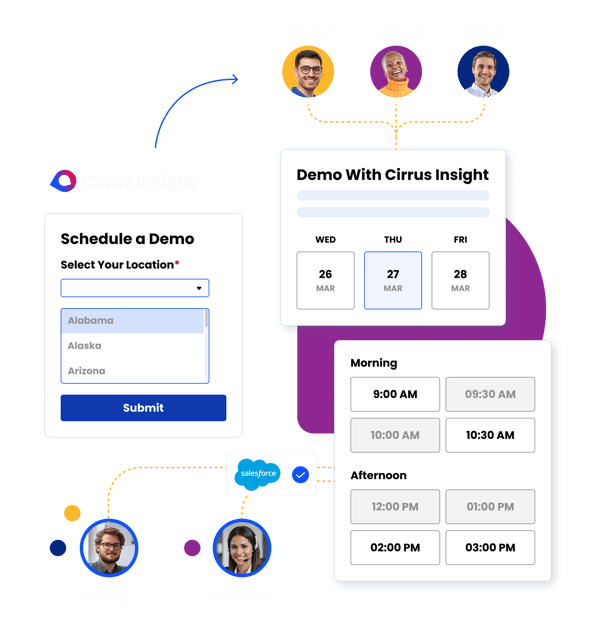
Cirrus Insight's Smart Scheduler instantly routes inbound leads to the right team member's calendar using customizable workflow logic. Here's how to configure it:
Define Your Routing Rules
Start by mapping out how leads should be assigned based on criteria like:
- Geographic territory
- Product interest or use case
- Company size or industry
- Lead score or qualification status
Configure Round-Robin or Weighted Distribution
For teams with multiple reps covering the same territory, set up distribution rules that balance workload fairly. Smart Scheduler supports both equal distribution and weighted assignment based on rep capacity.
Embed Scheduling Links in Your Forms
Once routing is configured, embed your scheduling links directly in lead capture forms and follow-up emails. Prospects can instantly book time on the appropriate rep's calendar—no back-and-forth required.
Cirrus Insight's scheduling tools sync directly to Salesforce, so every booked meeting automatically creates or updates the relevant records.
Step 3: Enable AI-Powered Pre-Meeting Briefings
With your data syncing and scheduling automated, you can now set up the feature that saves the most prep time: automated pre-meeting briefings.
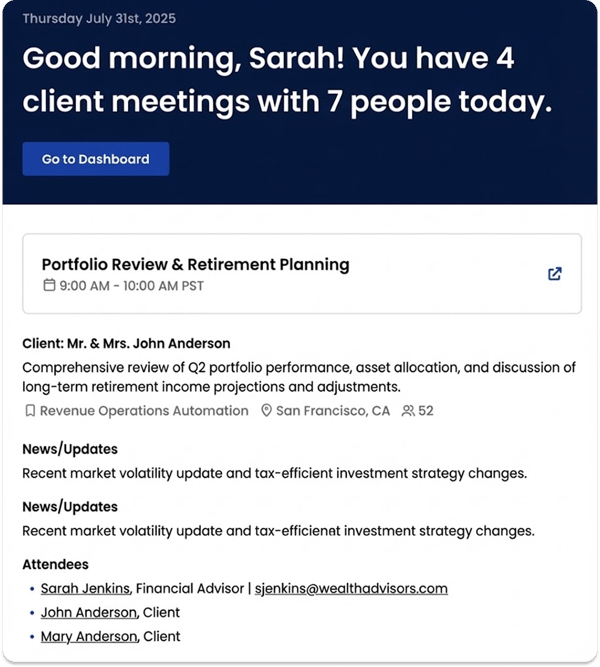
Cirrus Insight's Meeting AI scans your connected calendar each morning, identifies external meetings, and delivers actionable research directly to your inbox before your day begins.
What Meeting AI Delivers
Each briefing includes:
- Contact insights: Key details about who you're meeting, their role, and relationship history
- Company overview: Firmographics, recent news, and relevant business context
- Salesforce activity: Recent emails, calls, and engagement history from your CRM
- Opportunity context: Deal stage, open tasks, and recommended talking points
- Buyer signals: Email opens, link clicks, and attachment views that indicate engagement
Instead of spending 20 minutes piecing together information from multiple sources, you get a single summary ready when you start your day.
Step 4: Track Engagement with Buyer Signals
Preparation doesn't stop at knowing who you're meeting. Understanding how engaged your prospect is helps you tailor your approach.
Cirrus Insight's Buyer Signals gives you real-time visibility into how contacts interact with your emails. Track when they open messages, which links they click, and whether they've shared your content with colleagues.
Using Buyer Signals in Meeting Prep
Before your call, review which materials your prospect has engaged with. If they've clicked your pricing page link multiple times, you know budget is on their mind. If they've forwarded your case study to a colleague, you may be dealing with a larger buying committee.
This intelligence helps you prepare more relevant questions and anticipate objections.
Step 5: Keep Salesforce Updated Without Manual Entry
One of the biggest challenges with CRM automation is maintaining data quality. According to industry research, 66% of sellers would rather wait in line at the DMV than update their CRM.
Cirrus Insight addresses this by automatically syncing all meeting activity, email interactions, and scheduling data to Salesforce. When a meeting is booked through your scheduling link, Salesforce is updated. When an email is sent or received, it's logged. When a prospect engages with your content, that signal is captured.
This creates a complete activity history that feeds your pre-meeting briefings and gives managers visibility into deal progress—without relying on reps to manually enter data.

Step 6: Use Conversation Intelligence for Post-Meeting Insights
Automated meeting prep sets you up for success before the call. But what about capturing what happens during and after?
Cirrus Insight's Conversation Intelligence records, transcribes, and analyzes your sales conversations. It automatically identifies key moments, next steps, and action items from each call.
How This Enhances Your Workflow
After a meeting, Conversation Intelligence can:
- Generate meeting summaries with key discussion points
- Extract follow-up tasks and recommended next steps
- Update Salesforce records with call outcomes
- Identify coaching opportunities for sales managers
This closes the loop on your meeting automation workflow. Pre-call, you're prepared. Post-call, insights are captured and action items are clear.
Putting It All Together: A Unified Meeting Workflow
Here's what your automated meeting workflow looks like with Cirrus Insight connected to Salesforce:
- Lead submits form: Smart Scheduler routes them to the right rep and lets them book instantly
- Meeting is scheduled: Calendar sync creates the event in Salesforce automatically
- Morning of the meeting: Meeting AI delivers a briefing with contact, company, and activity insights
- Before the call: Buyer Signals shows recent engagement so you can tailor your approach
- During the call: Conversation Intelligence captures what's discussed
- After the call: Summaries, next steps, and CRM updates happen automatically
Every step is connected. Data flows from scheduling to prep to the call itself, with Salesforce staying updated throughout.
Common Mistakes to Avoid
As you implement meeting automation, watch out for these pitfalls:
Not Cleaning Your Existing Data First
Automated briefings pull from your Salesforce records. If those records are outdated or incomplete, your briefings will be too. Before enabling automation, audit your contact and account data for accuracy.
Over-Complicating Routing Rules
Start simple. You can always add complexity to your lead routing logic later. Beginning with too many rules often creates edge cases that cause leads to fall through the cracks.
Ignoring Adoption
Automation only works if your team uses it. Roll out new tools with training and clear communication about how they save time. Show reps the before-and-after difference in their prep workflow.
Measuring Success
Track these metrics to gauge the impact of your meeting automation:
- Time to first meeting: How quickly do inbound leads get on a rep's calendar?
- Prep time per meeting: How long do reps spend preparing for calls?
- CRM data completeness: What percentage of meetings have associated activity records?
- Meeting-to-opportunity conversion: Are better-prepared reps advancing more deals?
Most teams using Cirrus Insight's unified scheduling and meeting prep tools report significant reductions in prep time and improvements in rep productivity.
Frequently Asked Questions
How does automated meeting prep work with Salesforce?
Automated meeting prep pulls data from your Salesforce records—including contacts, accounts, opportunities, and logged activities—and compiles it into a briefing. Cirrus Insight's Meeting AI delivers these briefings to your inbox each morning, so you have everything you need before your first call.
Can I customize what appears in my pre-meeting briefings?
Yes. Cirrus Insight lets you configure which data points appear in your Meeting AI briefings. You can prioritize the information that matters most for your sales process, whether that's recent activity, open opportunities, or buyer signals.
Does inbound lead scheduling work with existing Salesforce workflows?
Cirrus Insight's Smart Scheduler integrates natively with Salesforce. When a lead books a meeting, the relevant Salesforce records are created or updated automatically. This works alongside your existing assignment rules and workflows.
What if I use Gmail and Outlook in the same organization?
Cirrus Insight supports both Gmail and Outlook environments. Your team can use whichever email client they prefer, and data syncs to Salesforce consistently across both platforms.
How is this different from native Salesforce meeting tools?
Cirrus Insight adds capabilities that extend beyond native Salesforce functionality, including AI-powered pre-meeting briefings, buyer signal tracking, and unified email-calendar-CRM sync from a single platform. This gives you meeting intelligence before, during, and after every sales conversation.


