


.png?width=18&height=18&name=Vector%20(5).png)




Sales teams today aren’t short on tools, they’re short on flow. A typical sales day means bouncing between the CRM, email, calendar, meeting platforms, notes, and enablement systems. This means the real work of selling often gets squeezed between meeting prep, follow-ups, and the dreaded end-of-day admin.
The result is predictable: reps lose context, leaders lose visibility, and critical updates like next steps, close dates, and deal notes become inconsistent because they live outside the moments where selling actually happens.
That’s exactly why the idea of a Sales Operating System (Sales OS) is gaining traction. It’s a way to unify the work across data, knowledge, and interactions so reps can show up prepared, run better discovery, and keep systems current.
What is a Sales Operating System?
A Sales Operating System (Sales OS) is the layer that orchestrates end-to-end selling work by connecting your customer data, deal context, and rep workflows, so execution is consistent and CRM updates happen as a natural byproduct of selling.
What it is put simply
A Sales OS is designed to answer:
- “What do I need to know right now about this account and these stakeholders?”
- “What should I do next?”
- “Can the system help me do it and keep the CRM accurate without extra effort?”
What it isn’t
A Sales OS isn’t just:
- CRM
- Sales engagement
- Conversation intelligence
- Enablement
It can integrate with all of these, but it’s defined by the workflow layer: it’s where reps operate.
What Must a Sales OS Include?
Pillar 1: Data Hub
A Sales OS needs a reliable foundation of account/contact/opportunity data—plus the ability to connect it to what’s happening today.
- Who are we meeting with?
- What opportunity is this tied to?
- What’s changed since the last touch?
Pillar 2: Knowledge Hub
This is the “understanding layer” that turns raw info into context:
- what you learned in discovery
- what the buyer cares about
- stakeholders and process signals
- positioning notes, competitive context, risks
Pillar 3: Interaction Hub
This is where Sales OS becomes real: it supports selling in the flow of email, meetings, follow-ups, and updates.
- Meeting prep delivered shortly before the call
- Live discovery assistance during the meeting
- Post-call admin captured as “review and approve” updates (close date, discount, amount, etc.)
A Sales OS works when Data + Knowledge + Interaction are unified, so reps don’t have to assemble context manually, and leaders don’t have to beg for updates.
Sales OS Capabilities
A Sales Operating System isn’t defined by a feature checklist as much as it’s defined by the jobs it takes off a rep’s plate and the consistency it creates for the business. The most useful way to explain it is through the moments that matter in a deal. Before, during, and after customer interactions, and how a Sales OS turns scattered activity into a guided workflow.
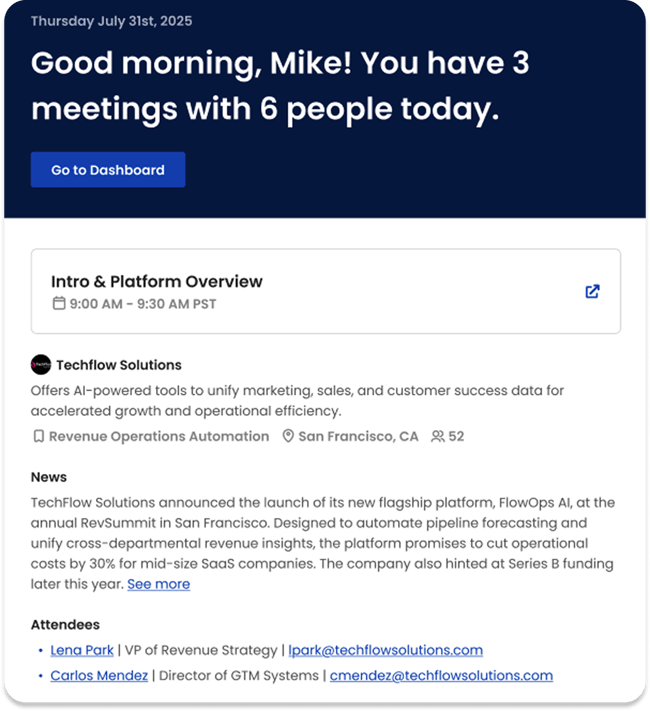
Meeting Prep: Context Delivered Before the Call
Sales OS value shows up immediately when it can generate proactive meeting prep. Instead of a rep stitching together context from the CRM, LinkedIn, old threads, and notes, a Sales OS can surface a pre-meeting brief that includes:
- Which companies and contacts are attending
- Key demographic/firmographic context
- Recent touchpoints and deal status
- Recommended positioning and discovery angles unique to the customer
This matters because showing up prepared is often the difference between a tactical call and a strategic one.
Discovery: In-the-moment Support That Improves Call Quality
Discovery is where deals are won or lost, and it’s also where reps are cognitively overloaded. A Sales OS can assist during the meeting with:
- Live transcription
- Highlights of key moments
- Suggested follow-up questions that reflect what’s being discussed in real time
This is an important distinction: the goal isn’t more notes. The goal is better conversations that capture pain, impact, stakeholders, process, and next steps.
Solution Creation: Turn Discovery Into an Actual Proposal-ready path
After discovery, reps often struggle to translate messy notes into a clear recommended approach. A Sales OS can:
- Ingest discovery context
- Generate multiple solution options
- List pros/cons based on the customer’s circumstances
- Provide a ranked recommendation with reasoning
Administration: The “Review & Approve” Model
This is where the category promise becomes very real: instead of asking reps to do CRM updates as a separate task, a Sales OS can infer updates from emails and meetings and present them as approvals, for example:
- Update close date based on an agreed timeline
- Update amount based on pricing/discount discussed
- Create follow-up tasks tied to the opportunity and contacts
This is the difference between activity logging and workflow completion. Admin work becomes a short review step.
Proposal Generation: Assemble the Deal Artifacts Buyers Actually Need
A Sales OS can help create the deliverables that slow deals down when they’re built manually. Your doc lists the pieces of a modern proposal package, including:
- Executive summary
- Quote
- ROI narrative/calculation
- Evaluation + implementation plan
- Positioning against alternatives/competitors
A Sales OS doesn’t just track the opportunity, it helps produce the artifacts that move it forward.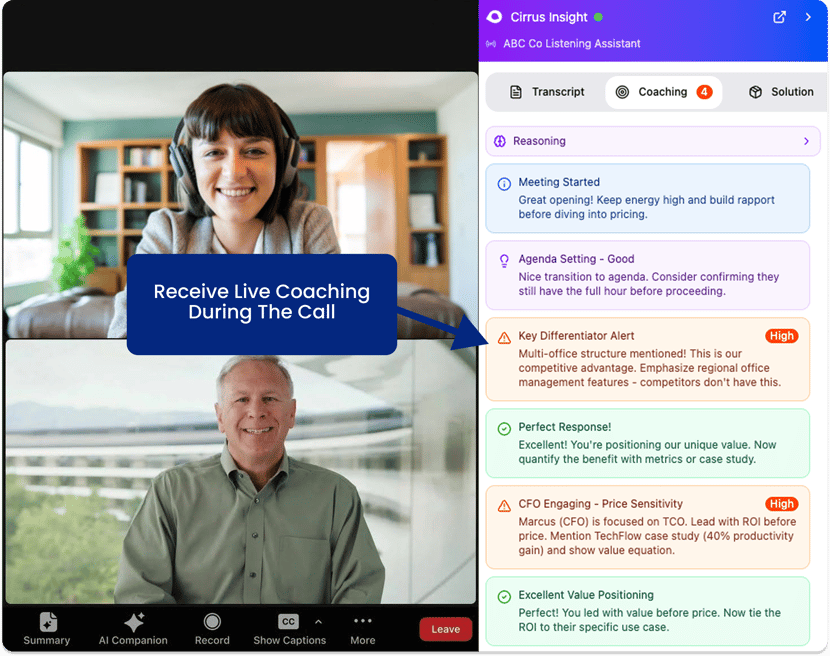
Coaching: Improve Skills, Not Just Compliance
Finally, a Sales OS can support leaders and reps with coaching workflows that include:
- Call markers placed at moments where the rep could have gone deeper
- Recommendations for better questions
- Praise markers to reinforce what worked
That framing matters because the best coaching tools don’t feel like surveillance, they feel like a personal trainer for selling.
Sales OS vs. CRM (And How They Work Together)
Most teams don’t want to rip and replace their CRM, and they don’t need to in order to benefit from a Sales OS.
The Clean Distinction
- CRM = system of record. It stores structured fields, pipeline stages, and reporting.
- Sales OS = system of work. It orchestrates the activities that create those updates: meetings, follow-ups, decision-making, and next steps.
Your CRM tells you where the deal stands. A Sales OS helps you move the deal forward.
Why CRM Alone Isn’t Enough
CRMs were built to manage data and forecast sales, not to:
- Generate pre-call context
- Guide discovery in real time
- Create proposal artifacts
- Infer updates from conversations and turn them into approvals
Those are workflow problems, and that’s why the Sales OS layer exists.
The Practical Story
In practice, a Sales OS should:
- Pull in CRM context (account/opportunity data)
- Enrich it with what’s happening in meetings and email
- Help the rep execute
- Then write back clean updates, ideally as “review and approve.”
Sales OS value is highest when it meets reps where they already work.
Why the Sales OS Category is Emerging Now
Over the last decade, sales teams added specialized tools for every slice of the process. The result: lots of capability, but low cohesion. Reps have been stitching together context manually. A Sales OS is the response. Not another point solution, but the connective system that reduces fragmentation.
The Buyer Journey Got More Complex
More stakeholders, longer cycles, more scrutiny. That pushes teams toward systems that can:
- Preserve context across many interactions
- Keep next steps explicit
- Create consistent deal narratives
That’s also why proposal components like ROI, plans, and positioning have become essential artifacts.
AI Made Workflow & Context Automation Feasible
For a long time, operating system language was aspirational because the system couldn’t understand what happened in calls and emails well enough to act. With modern AI, it’s now realistic to:
- Summarize and structure meetings
- Infer tasks and CRM updates
- Generate customer-specific messaging and artifacts
- Offer contextual guidance during discovery
The Market is Starting to Define It
One reason Sales OS is gaining traction is that teams are increasingly shaping the definition themselves. What they want isn’t another tool, it’s a unified way of working.
How to Evaluate a Sales Operating System
A Sales OS sounds great in theory, until you try to implement it and realize you’ve added another layer to an already busy tech stack. The best Sales Operating Systems earn adoption because they make a rep’s day easier immediately, and they create cleaner data and more consistent execution without requiring intense discipline. Here’s a practical way to evaluate one.
Does it reduce rep work?
Look for measurable reduction in:
- Meeting prep time
- Manual note-taking and recap work
- Follow-up creation
- CRM updating
A Sales OS should turn “after the call admin” into a fast review-and-approve step, where the system proposes updates and reps confirm them.
Does it Unify Data & Knowledge & Interaction?
A true Sales OS ties together:
- Data: accounts, contacts, opportunities
- Knowledge: what was learned, risks, stakeholders, buying process
- Interaction: meetings, email, tasks and next steps
If it can’t connect these in a single workflow loop, it’s not really an operating-system, it’s just an add-on.
Does it Show Up in the Moments That Matter?
The best “OS” value is time-based:
- Before: proactive meeting prep with customer-specific recommendations
- During: real-time discovery support (transcription + suggested follow-ups)
- After: inferred tasks and suggested CRM updates based on what actually happened
If value only appears in dashboards, you’ll struggle with rep adoption.
Does it Improve CRM Quality as a Byproduct?
A strong Sales OS:
- Proposes updates (close date, amount, next step) with context
- Makes approval easy
- Keeps updates tied to actual meeting/email activity
Can RevOps Govern it?
You want:
- Configurable rules (what gets suggested, when, and for whom)
- Auditability (why did it suggest that close date?)
- Controls (approvals, templates, role-based behavior)
Where Cirrus Fits
If your CRM is where data ends up, Cirrus has historically been strong at living where salespeople actually work, especially around the daily flow of email, calendar, meetings, and CRM actions. That’s a natural home for a Sales Operating System experience, because the OS layer works best when it doesn’t force reps into yet another destination app.
A Sales OS has to meet reps inside their workflow:
- Deliver meeting prep at the right time
- Capture what happened in customer conversations
- Make follow-ups and CRM updates quick to approve
Cirrus is well-positioned to support this because it already sits close to the moments where reps plan, communicate, and update.

Frequently Asked Questions (FAQs)
Is a Sales OS the same thing as a CRM?
No. A CRM is primarily a system of record for structured data and reporting. A Sales OS is a system of work that orchestrates meetings, follow-ups, guidance, and updates. It often integrates with the CRM rather than replacing it.
What problems does a Sales OS solve?
Common problems include time-consuming meeting prep, scattered deal context, inconsistent follow-ups, and low-quality CRM updates. Many Sales OS approaches specifically target admin through “review and approve” updates inferred from meetings and emails.
What are examples of Sales OS capabilities?
Examples include proactive meeting prep briefs, real-time discovery assistance, inferred tasks and suggested CRM updates, proposal generation, and coaching markers on calls.
Do I need to replace my current tools to adopt a Sales OS?
Usually not. Most teams adopt Sales OS capabilities by layering them into existing workflows and expanding from one high-friction area.
How do I evaluate whether a Sales OS will actually be adopted?
Look for solutions that reduce rep effort immediately, show up inside the tools reps already live in, and make CRM hygiene easier through approvals rather than extra manual entry.
Why is Sales OS showing up everywhere right now?
Because teams are hitting the limits of tool sprawl and manual context-switching, and AI makes it feasible to automate workflows like meeting summaries, task creation, and proposal building. Community-driven efforts are also helping the category take shape.


