


.png?width=18&height=18&name=Vector%20(5).png)



July 2024 Release Notes
Overview
This week’s release contains more fixes and enhancements to the sidebar and admin dashboard:
- A couple bugs were fixed related to the new Buyer Signals UI and the Book Meeting screen showing the wrong date in some scenarios.
Fixes
Sidebar - Book Meeting
- A bug was discovered that would display the wrong date. This would occur in certain circumstances based on the user’s location.
A fix was implemented so we show the correct date on the Book Meeting screen.
Sidebar - New Buyer Signals Replies Counter
- Occasionally the Replies signal would not show any results despite replies being received.
A fix was implemented to improve the accuracy of the Replies signal counter.
Overview
This week’s release contains more fixes and enhancements to the sidebar and admin dashboard:
- We have released an enhancement to the Admin Dashboard sync and scheduling analytics screens to prevent admins from starting multiple sync jobs for the same user.
- A fix has been implemented to Email Blast Sync.
Enhancements
Admin Dashboard - Start Sync
- In some situations an admin may accidentally click the Start sync button multiple times resulting in duplicate sync results.
We have enhanced the Analytics screens for Calendar Sync, Emails Sync, Tasks Sync, and Scheduling Usage to ensure admins cannot unintentionally initiate sync more than once.
Fixes
Email Blast Sync - Sync to Person account
- For some customers Email Blast Sync was not relating the email to the intended object when “Sync Emails to Person Accounts” was enabled.
A fix was implemented to ensure sync properly associates the email to the intended person objects.
Overview
This week’s release contains several fixes and enhancements to the sidebar:
-
Events can now be filed to user records (must be enabled for your org, steps below)
-
Book Meeting now respects the org’s setting for how far out a user can pick times
-
Buyer Signal counters are now shown persistently and let users know when they did not enable a given option
-
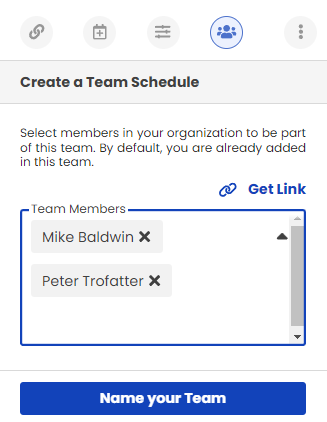
Team Scheduling Team Member picker UI has been updated
-
Buyer Signals open counter is more accurate, fixed the issue with showing 0 opens
Enhancements
Sidebar - File Events to Users
A new Sidebar feature has been added and is available to be enabled upon request:
-
A new setting called "Add User attendees to Events" has been added to the sidebar's File Event screen that provides users the ability to file events to user records. This field is visible when filing to Contacts or Leads and is persistent as the user switches between the two different types of person accounts.
To enable it do the following:
- Contact support and request the feature called “Add User Attendees to Events” to be enabled.
-
Make sure the admin setting “Add All Invitees to Salesforce Event” is enabled for the org
-
Open the sidebar and click the hamburger menu at the top left
-
Under the Settings section click Sidebar
-
In the next screen will be a setting called "Add User attendees to Events", enable this and click Update at the bottom right.
-
Go back to the home screen of the sidebar and users should now see the User Attendees field showing up under the Type field.
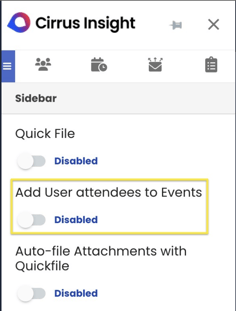
When enabled, a new field will be available below the Type field. This can be used when filing to Contact and Leads: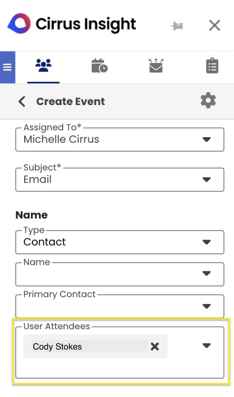
Sidebar - Book Meeting Time Frame
- The Book Meeting feature limited the time frame a user could look out to 2 months. This limited the ability to provide availability further into the future.
This feature’s behavior was updated to reference the admin dashboard setting called “Default Calendar View”. Going forward the Book Meeting feature will let users look out to what ever is configured in this view, up to 6 months.
Sidebar - Buyer Signals
- Originally Buyer Signal UI elements would be hidden if the user did not enable it’s relevant tracking feature.
Going forward we will always show the buyer signal elements (Opens, Replies, Clicks). If a tracking option was not enabled on the email, the corresponding signal will be greyed out and inform the user that it was not enabled via a tooltip when moused over.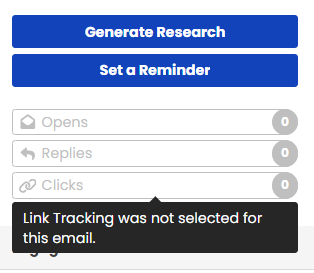

Team Scheduling - Team Member picker
- The original team member picker used the old multi select component which was cumbersome and confusing to use.
We have updated the multi pick component to the newest version that is much more intuitive.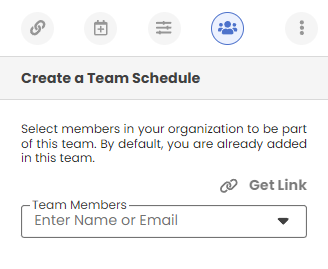
Fixes
Sidebar - Buyer Signal Opens
- For some users the Buyer Signals Opens counter would show 0 despite the email having been opened and replied to.
A fix has been implemented to improve open rate tracking for newly sent emails.


