


.png?width=18&height=18&name=Vector%20(5).png)




Your sales reps are having dozens of conversations every week. Objections. Buying signals. Budget hints. Competitive mentions.
And then… most of it disappears.
If you’re not using sales call recording software, you’re relying on memory, scattered notes, and “I think the deal is looking good” updates in your CRM. That’s not strategy, that’s guesswork.
Modern sales call recording software changes that. It doesn’t just capture conversations. It turns them into searchable transcripts, highlights key moments, flags risks, surfaces next steps, and in some cases, updates your CRM automatically. Suddenly, every call becomes coaching material. Every objection becomes data. Every deal becomes clearer.
In this guide, we’ll break down the best sales call recording software for 2026, compare features and pricing, and help you choose a tool that doesn’t just record calls, but actually helps you close more of them.
What Is Sales Call Recording Software?
Sales call recording software is a tool that captures, stores, and analyzes sales conversations, whether they happen over phone, Zoom, Google Meet, or other conferencing platforms.
At its most basic level, it records calls so reps and managers can replay them later. But modern platforms go far beyond simple playback.
Today’s sales call recording software typically includes:
- Automatic call recording (inbound, outbound, and virtual meetings)
- AI-powered transcription for searchable conversation history
- Keyword and topic tracking (pricing, competitors, objections)
- Speaker identification and talk-to-listen ratio analysis
- Automated summaries and action item extraction
- CRM integration to attach recordings to opportunities
In other words, it turns conversations into structured data.
Instead of relying on rep notes or memory, sales leaders can review real calls, identify coaching opportunities, analyze winning patterns, and understand why deals stall. Revenue teams gain visibility into what’s actually being said, not just what’s being reported.
And when integrated properly with your CRM, sales call recording software doesn’t just document conversations. It helps improve forecasting accuracy, coaching effectiveness, and overall sales performance.
10 Best Sales Call Recording Software Tools in 2026
Choosing the right sales call recording software isn’t just about capturing audio, it’s about turning conversations into coaching insights, pipeline visibility, and revenue intelligence.
Here’s a detailed look at the top tools revenue teams are using in 2026.
1. Cirrus Insight
If your team lives in Salesforce and wants conversations to automatically update the pipeline without manual logging, this is where things stand out. Cirrus Insight goes beyond basic recording by capturing meetings, generating AI summaries, and syncing everything directly to Salesforce.
Best for: Salesforce-driven revenue teams that want recording plus automation
Key recording features:
- Video meeting recording
- Full AI transcription
- Automatic sync to Salesforce opportunities
- Activity capture attached to contacts and accounts
AI & coaching capabilities:
- Conversational Insights with AI-generated summaries
- Automatic post-call action items
- Buyer signal tracking
- Live coaching nudges
- Prioritized next-step recommendations
CRM integrations: Native Salesforce integration
Pricing tier: Starts around $14/user/month (advanced plans vary)
Pros:
- Eliminates manual activity logging
- Keeps Salesforce data accurate automatically
- Combines recording, meeting prep, and scheduling automation
- Faster implementation than enterprise intelligence platforms
Limitations:
- Best suited for Salesforce users
- Not a standalone CRM

2. Gong
Gong is widely known in the conversation intelligence space and focuses heavily on analytics and coaching at scale.
Best for: Enterprise sales organizations
Key recording features:
- Multi-channel call recording
- AI transcription
- Searchable call database
AI & coaching capabilities:
- Objection and competitor tracking
- Sentiment analysis
- Talk-time ratio metrics
- Deal risk detection
- Coaching dashboards
CRM integrations: Salesforce, HubSpot
Pricing tier: Typically ~$1,200–$1,600 per user/year
Pros:
- Deep analytics
- Strong coaching tools
- Enterprise scalability
Limitations:
- Expensive
- Longer onboarding process
3. Chorus (ZoomInfo)
Chorus blends call recording with revenue intelligence and integrates with ZoomInfo’s data ecosystem.
Best for: Teams using ZoomInfo for prospect data
Key recording features:
- Call recording and transcription
- Conversation tagging
- Searchable call library
AI & coaching capabilities:
- Competitive mention alerts
- Keyword tracking
- Deal progression insights
CRM integrations: Salesforce, HubSpot
Pricing tier: Custom enterprise pricing
Pros:
- Strong integration with ZoomInfo
- Useful competitive tracking
Limitations:
- Premium pricing
- Heavier platform for smaller teams
4. Clari Copilot
Clari Copilot focuses on aligning conversation intelligence directly with forecasting accuracy.
Best for: Revenue teams prioritizing forecast visibility
Key recording features:
- Call recording
- Conversation capture tied to opportunities
AI & coaching capabilities:
- Forecast risk indicators
- Deal health insights
- Revenue prediction support
CRM integrations: Salesforce
Pricing tier: Enterprise pricing
Pros:
- Strong revenue alignment
- Helpful for forecasting
Limitations:
- Best suited for Clari ecosystem
- Limited engagement automation
5. Avoma
Avoma combines meeting intelligence with lightweight coaching functionality.
Best for: Sales and customer success teams
Key recording features:
- Automatic recording
- AI transcription
- Structured meeting notes
AI & coaching capabilities:
- Topic tracking
- Scorecards
- Objection tagging
CRM integrations: Salesforce, HubSpot
Pricing tier: Starts around $24–$29/user/month
Pros:
- Easy to use
- Affordable for mid-market teams
Limitations:
- Less advanced forecasting intelligence
- Lighter coaching analytics
6. Fireflies.ai
Fireflies is often chosen for simple, affordable AI call transcription.
Best for: Teams needing straightforward AI recording
Key recording features:
- Automatic recording
- AI transcription
- Searchable transcripts
AI & coaching capabilities:
- Keyword tracking
- Basic action item extraction
CRM integrations: Salesforce, HubSpot, Zapier
Pricing tier: Free plan available; paid plans ~$10–$19/user/month
Pros:
- Budget-friendly
- Quick setup
Limitations:
- Limited sales coaching depth
- Basic analytics compared to enterprise tools
7. HubSpot Conversation Intelligence
Built into HubSpot Sales Hub, this tool supports teams already inside the HubSpot ecosystem.
Best for: HubSpot CRM users
Key recording features:
- Call recording
- AI transcription
- Activity logging
AI & coaching capabilities:
- Call analytics
- Keyword tracking
- Coaching insights
CRM integrations: Native HubSpot
Pricing tier: Included in Sales Hub Professional and Enterprise
Pros:
- Seamless for HubSpot users
- No extra platform required
Limitations:
- Limited outside HubSpot
- Less advanced AI depth
8. Outreach Kaia
Outreach Kaia focuses on real-time in-call coaching for outbound teams.
Best for: SDR-heavy outbound teams
Key recording features:
- Call recording
- Conversation capture
AI & coaching capabilities:
- Real-time talk tracks
- Objection prompts
- Keyword alerts
CRM integrations: Salesforce and Outreach
Pricing tier: Enterprise pricing
Pros:
- Strong real-time coaching
- Helpful for onboarding
Limitations:
- Best within Outreach ecosystem
- Limited standalone analytics
9. CallRail
CallRail is primarily known for marketing attribution but includes call recording capabilities.
Best for: Marketing and sales hybrid teams
Key recording features:
- Call tracking and recording
- Attribution tagging
AI & coaching capabilities:
- Conversation intelligence
- Lead qualification tagging
CRM integrations: Salesforce, HubSpot
Pricing tier: Starts around $45/month
Pros:
- Strong marketing attribution
- Affordable entry point
Limitations:
- Not purpose-built for B2B sales coaching
- Limited enterprise forecasting features
10. Kickscale
Kickscale focuses on performance analytics and conversation-driven revenue optimization.
Best for: Performance-focused revenue teams
Key recording features:
- AI call recording
- Transcript search
- Conversation tagging
AI & coaching capabilities:
- Performance dashboards
- AI-driven deal insights
- Coaching analytics
CRM integrations: Salesforce, HubSpot
Pricing tier: Custom pricing
Pros:
- Strong performance visibility
- Good coaching insights
Limitations:
- Smaller ecosystem
- Less workflow automation than CRM-native tools
Sales Call Recording Software: Strategic Comparison
|
Tool |
Implementation effort |
Ideal team type |
Core revenuerervenue impact |
|
Cirrus Insight |
Low (Salesforce-native rollout) |
Salesforce-driven growth & enterprise teams |
Improves pipeline accuracy through automated activity capture |
|
Gong |
High (enterprise onboarding) |
Large enterprise revenue orgs |
Deep coaching analytics + deal risk visibility |
|
Chorus |
High |
Data-driven enterprise sales teams |
Competitive tracking + performance benchmarking |
|
Clari Copilot |
Moderate to high |
Forecast-focused revenue teams |
Forecast precision + deal inspection insights |
|
Avoma |
Low |
SMB & mid-market teams |
Structured note automation + rep coaching |
|
Fireflies.ai |
Very low |
Small teams & cross-functional users |
AI transcription efficiency |
|
HubSpot CI |
Low (HubSpot-native) |
HubSpot-centric sales teams |
Native call logging + lightweight coaching |
|
Outreach Kaia |
Moderate |
SDR-heavy outbound teams |
Real-time call guidance |
|
CallRail |
Low |
Marketing-led revenue teams |
Call attribution + lead tracking |
|
Kickscale |
Moderate |
Performance-optimized teams |
Conversation-base |
Key Features to Look for in Sales Call Recording Software
Not all sales call recording software is built the same. Some tools simply record conversations. Others turn those conversations into coaching insights, forecast signals, and automated CRM updates.
How accurate is the AI transcription?
If the transcript isn’t accurate, everything built on top of it breaks down.
Look for software that offers:
- High transcription accuracy across accents and industries
- Custom vocabulary support (product names, competitors, acronyms)
- Clear speaker identification
- Fully searchable transcripts
Accurate transcription is the foundation of reliable sales intelligence.
Does it sync deeply with your CRM?
Basic logging isn’t enough. The most reliable sales recording software should:
- Automatically attach calls to opportunities
- Update contacts and accounts with summaries
- Log activity without manual data entry
- Improve forecast visibility in real time
If reps are still copy-pasting notes, you’re adding friction instead of removing it.
Does it generate AI summaries and next steps automatically?
Recording a call is helpful. Extracting structured insights is powerful.
The best AI call sales recording software should:
- Generate clear call summaries
- Highlight objections and competitor mentions
- Extract action items
- Create follow-up tasks
This is where automation starts impacting revenue execution.
Can it actually improve rep coaching?
For sales leaders, recordings only matter if they improve performance.
Look for tools that provide:
- Talk-to-listen ratio analysis software
- Keyword and objection tracking
- Coaching dashboards
- Rep performance comparisons
- Conversation trend insights
Without coaching visibility, recordings become passive archives.
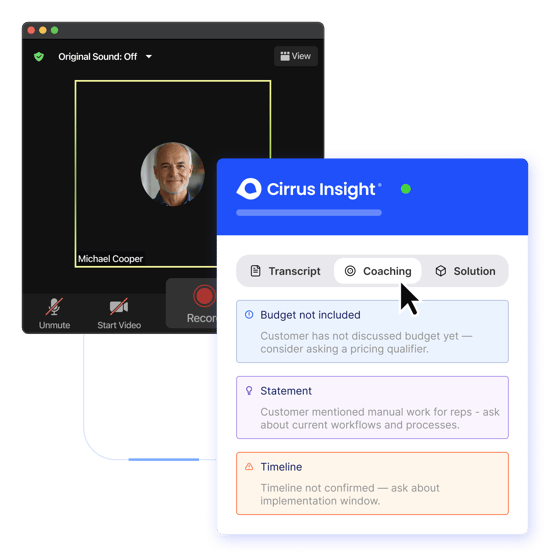
Cirrus Insight: Turn Sales Call Recording Into Revenue Action
Recording calls is easy. Turning those conversations into pipeline momentum? That’s where most tools stop short.
Cirrus Insight is built for revenue teams that want more than a searchable transcript. It captures your sales calls, generates AI-powered summaries, extracts next steps, and automatically syncs everything to Salesforce, so your CRM reflects what actually happened on the call, not what someone remembered to type in later.
Instead of juggling recordings, notes, and follow-up tasks, your team gets:
- Automatic email and meeting sync with Salesforce
- AI meeting summaries with prioritized action items
- Buyer signal tracking to surface deal intent
- Smart Scheduler automation to remove booking friction
- Sales cadences to keep follow-ups consistent
- Live coaching nudges to improve performance in real time
If you’re evaluating sales call recording software, the real question isn’t just “Can it record calls?” It’s “Does it help us close more deals?”
Cirrus Insight connects conversations directly to execution, before, during, and after every call, so your sales activity automatically becomes pipeline progress.
Sales Call Recording Softwar: FAQs
What is sales call recording software?
Sales call recording software captures, stores, and analyzes sales conversations across phone and video platforms. Modern tools go beyond simple recording by offering AI transcription, keyword tracking, coaching analytics, and CRM integration to improve sales performance.
What is the best sales call recording software?
The best sales call recording software depends on your team’s needs. Enterprise teams often choose platforms with deep coaching analytics, while Salesforce-driven teams may prefer CRM-native solutions that automatically sync call data and summaries directly into opportunities.
How does AI call sales recording software work?
AI call sales recording software automatically records conversations, transcribes them using artificial intelligence, identifies key topics and objections, and generates summaries or action items. Advanced tools also sync this data to your CRM to improve pipeline accuracy and follow-up execution.
Is sales call recording software legal?
In most regions, sales call recording is legal as long as proper consent requirements are met. Laws vary by country and state, so it’s important to use software that supports compliance features like consent notifications and secure data storage.
How does sales call recording improve sales enablement?
Sales call recording improves sales enablement by providing real examples for coaching, onboarding, and performance analysis. Managers can review calls to identify winning behaviors, refine messaging, and help reps handle objections more effectively.
What is the most reliable sales recording software?
The most reliable sales recording software offers high transcription accuracy, deep CRM integration, strong security compliance (SOC 2, GDPR), and automated activity logging. Reliability also depends on how well the tool fits your existing sales workflow.
Does sales call recording software integrate with Salesforce?
Yes, many leading platforms integrate with Salesforce. The most advanced solutions automatically sync recordings, summaries, and next steps to opportunities and contact records, reducing manual data entry and improving forecasting visibility.
Can sales call recording software create follow-up tasks automatically?
Some advanced platforms use AI to extract next steps from conversations and automatically create tasks or reminders in your CRM. This helps ensure no action items are missed after important sales calls.
What features should I look for in the best call recording software for sales enablement?
Look for AI transcription accuracy, coaching dashboards, keyword tracking, automated summaries, CRM sync depth, and workflow automation. These features ensure recordings translate into measurable performance improvements rather than just stored audio files.


