


.png?width=18&height=18&name=Vector%20(5).png)




Sales teams don’t have a revenue problem.
They have a time problem.
According to Salesforce research, reps spend less than one-third of their time actually selling. The rest? Updating CRM records. Logging emails. Creating tasks. Chasing follow-ups. Fixing messy data.
And here’s the uncomfortable truth:
A CRM is only powerful if it’s accurate.
And it’s only accurate if it’s updated.
And manual updates don’t scale.
That’s where CRM automation tools change everything.
Instead of forcing reps to become data-entry clerks, automation works quietly in the background, syncing emails, updating deal stages, routing leads, triggering follow-ups, and keeping pipeline reports clean without constant manual effort.
In this guide, we’ll break down:
- What CRM automation tools actually do
- The difference between CRM marketing automation tools and sales automation tools
- The best CRM automation tools available today
- How to choose the right solution for your team
- Where AI fits into the future of CRM automation
What Are CRM Automation Tools?
CRM automation tools are software solutions that automatically handle repetitive tasks inside your customer relationship management (CRM) system, without requiring constant manual input from your sales or marketing team.
In simple terms. A CRM stores data. CRM automation tools move and update that data for you.
Instead of asking reps to log every email, update every opportunity stage, assign every task, and trigger every follow-up manually, automation ensures those actions happen in the background.
How CRM Automation Works
CRM automation works through predefined workflows, triggers, and integrations.
When a specific action occurs such as:
- A new lead fills out a form
- A prospect opens an email
- A meeting is scheduled
- A deal moves to a new stage
The system automatically executes the next step.
That could mean:
- Assigning the lead to a rep
- Logging the email into the CRM
- Creating a follow-up task
- Sending a nurture email
- Updating a forecast report
More advanced CRM automation tools now incorporate AI to identify patterns, suggest next steps, and prioritize high-intent opportunities.
10 Best CRM Automation Tools in 2026
Choosing the right CRM automation tool isn’t about features alone, it’s about how deeply automation integrates into your daily workflows.
Below is a practical, revenue-focused breakdown of the top CRM automation tools in 2026, structured to help you compare capabilities clearly.
1. Salesforce (Automation Capabilities Overview)
Best for: Enterprise teams needing deep customization and scalable automation.
Key Automation Features:
- Workflow Rules & Flow Builder
- Lead routing automation
- Opportunity stage triggers
- Forecasting automation
- Einstein AI predictions
- Approval process automation
Integrations: Extensive marketplace (AppExchange), Slack, HubSpot, Outlook, Gmail, Zoom, and thousands more.
Pricing: Sales Cloud plans typically start around $25/user/month (Essentials), scaling to enterprise tiers.
Pros:
- Extremely powerful automation engine
- Highly customizable workflows
- Advanced AI forecasting with Einstein
- Enterprise-grade scalability
Limitations:
- Requires admin expertise to configure properly
- Automation can become complex quickly
- Expensive at scale
Insight: Salesforce is the automation backbone for large revenue teams, but without proper configuration or complementary tools, it can become heavy and underutilized.

2. Cirrus Insight (CRM Automation Inside the Inbox)
Best for: Salesforce teams wanting to eliminate manual data entry and automate CRM updates directly from their inbox.
Key Automation Features:
- Automatic email & meeting sync with Salesforce
- AI-powered Meeting summaries
- Real-time note logging
- Smart Scheduler (automated lead routing)
- Sales Cadences
- Email & attachment tracking (Buyer Signals)
- Automated task creation
Integrations: Salesforce, Gmail, Outlook, Zoom, Microsoft 365.
Pricing: Flexible pricing, so you only pay for the features you use.
Pros:
- Eliminates manual CRM updates
- Keeps Salesforce 100% up to date
- AI-powered meeting prep & summaries
- Works directly inside inbox
- Improves forecasting accuracy
Limitations:
- Built primarily for Salesforce users
- Not a standalone CRM
Insight: Cirrus Insight strengthens Salesforce automation by handling the part most CRMs struggle with, consistent, automatic activity capture and meeting intelligence. Schedule a demo here.
3. HubSpot CRM
Best for: Growing sales and marketing teams that want CRM + marketing automation in one ecosystem.
Key Automation Features:
- Email sequences
- Lead scoring
- Pipeline automation
- Marketing workflow automation
- Task automation
- Trigger-based email campaigns
Integrations: Gmail, Outlook, Salesforce, Slack, Zapier, Shopify.
Pricing: Free CRM; automation features start in paid Marketing Hub/Sales Hub tiers (~$20–$800+ per month depending on scale).
Pros:
- Easy-to-use interface
- Strong marketing automation
- Built-in email tracking
- Fast implementation
Limitations:
- Advanced automation locked behind higher tiers
- Costs rise quickly with contact volume
Insight: HubSpot shines in CRM marketing automation tools, especially for inbound-driven teams.
4. Zoho CRM
Best for: SMBs seeking affordable CRM automation.
Key Automation Features:
- Blueprint workflow automation
- SalesSignals (real-time alerts)
- Email automation
- AI assistant (Zia)
- Lead scoring rules
Integrations: Google Workspace, Microsoft 365, Slack, Mailchimp, Zapier.
Pricing: Starts around $14–$23/user/month.
Pros:
- Cost-effective
- Built-in AI capabilities
- Strong automation for price point
Limitations:
- UI less intuitive than competitors
- Complex workflows can be harder to manage
Insight: Zoho offers solid CRM automation tools at a lower entry price, ideal for lean teams.
5. Pipedrive
Best for: Sales-focused teams wanting pipeline-driven automation.
Key Automation Features:
- Workflow automation templates
- Activity triggers
- Deal stage automations
- Email sync automation
- Smart contact data
Integrations: Slack, Trello, Mailchimp, Zoom, Zapier.
Pricing: Starts around $14.90/user/month.
Pros:
- Extremely user-friendly
- Visual pipeline focus
- Fast setup
Limitations:
- Less advanced marketing automation
- Limited enterprise customization
Insight: Pipedrive simplifies automation around deal movement, strong for sales velocity.
6. ActiveCampaign (Marketing Automation Focus)
Best for: Businesses prioritizing CRM marketing automation tools.
Key Automation Features:
- Advanced email marketing automation
- Behavioral triggers
- Lead scoring
- Sales automation pipelines
- Multi-step nurture sequences
Integrations: Shopify, WordPress, Salesforce, Zapier.
Pricing: Starts around $29/month.
Pros:
- Extremely strong marketing automation
- Advanced segmentation
- Behavioral-based automation
Limitations:
- CRM functionality secondary to marketing
- Can become complex for small teams
Insight: ActiveCampaign excels in marketing automation and CRM tools combined, ideal for nurture-heavy funnels.
7. Monday Sales CRM
Best for: Teams wanting visual workflow automation across departments.
Key Automation Features:
- Custom workflow automations
- Activity tracking
- Task triggers
- Lead routing
- Pipeline dashboards
Integrations: Gmail, Outlook, Slack, Zoom, Salesforce.
Pricing: Starts around $10–$24/user/month.
Pros:
- Highly visual
- Flexible automation builder
- Good cross-functional visibility
Limitations:
- CRM depth not as advanced as Salesforce
- Limited AI forecasting features
Insight: Monday bridges project management and CRM automation well for collaborative teams.
8. Freshsales
Best for: Mid-market teams needing built-in AI.
Key Automation Features:
- Freddy AI lead scoring
- Workflow automation
- Auto-assignment rules
- Email tracking
- Deal insights
Integrations: Google Workspace, Outlook, Zapier, Mailchimp.
Pricing: Starts around $15/user/month.
Pros:
- Built-in AI assistant
- Affordable
- Strong email tracking
Limitations:
- Customization less robust than Salesforce
- Enterprise capabilities limited
Insight: Freshsales balances automation and AI for mid-sized revenue teams.
9. Keap
Best for: Small businesses combining CRM and marketing automation.
Key Automation Features:
- Email campaigns
- Automated follow-ups
- Appointment scheduling
- Lead capture forms
- Payment automation
Integrations: Gmail, Outlook, QuickBooks, Zapier.
Pricing: Starts around $159/month.
Pros:
- Strong SMB focus
- Built-in payments
- Automation templates
Limitations:
- Expensive for small teams
- Less scalable for enterprise
Insight: Keap works best when sales and marketing automation are tightly integrated in smaller organizations.
10. Zapier (Workflow Automation Bridge)
Best for: Connecting multiple tools together for cross-platform automation.
Key Automation Features:
- Trigger-based workflows (“Zaps”)
- App-to-app data transfers
- Conditional logic
- Multi-step automations
Integrations: 6,000+ apps.
Pricing: Free tier available; paid plans start around $20/month.
Pros:
- Extremely flexible
- Works across nearly any software stack
- No-code setup
Limitations:
- Not a CRM itself
- Requires maintenance as workflows grow
Insight: Zapier acts as the glue between CRM and marketing automation tools, ideal for stitching systems together.
CRM Automation Tools Comparison Overview (2026)
|
Tool |
Ideal Team Size |
Automation Strength |
AI & Implementation Level |
|
Salesforce |
Mid-market to Enterprise |
Advanced workflow & forecasting automation |
Strong AI (Einstein); High setup complexity |
|
Cirrus Insight |
Salesforce-based teams (SMB–Enterprise) |
Activity sync & meeting automation |
AI-powered meeting intelligence; Easy add-on setup |
|
HubSpot CRM |
SMB to Mid-market |
Marketing + sales automation combined |
Moderate AI; Easy–Moderate setup |
|
Zoho CRM |
SMB |
Affordable workflow automation |
Built-in AI (Zia); Moderate setup |
|
Pipedrive |
Small to Mid-sized sales teams |
Pipeline & deal-stage automation |
Light AI; Very easy setup |
|
ActiveCampaign |
Marketing-driven SMBs |
Advanced marketing automation |
Behavioral AI; Moderate setup |
|
Monday Sales CRM |
Cross-functional teams |
Workflow & task automation |
Light AI; Easy setup |
|
Freshsales |
SMB to Mid-market |
Lead scoring & email automation |
Built-in AI (Freddy); Easy setup |
|
Keap |
Small businesses |
CRM + marketing + payments automation |
Limited AI; Easy setup |
|
Zapier |
Any size (tech stack connector) |
Cross-platform workflow automation |
No native AI; Easy–Moderate setup |
How to Choose the Right CRM Automation Tool
The best CRM automation tool isn’t the one with the most features.
It’s the one that removes your team’s biggest friction.
Here’s how to decide quickly and strategically.
1. Team Size
- Small teams need easy setup and prebuilt workflows
- Mid-market teams need stronger reporting and structured automation
- Enterprise teams require customization, territory routing, and scalable controls
The larger the team, the more critical automation consistency becomes.
2. Sales vs Marketing Focus
Identify your main bottleneck.
- Need lead nurturing and segmentation? → Prioritize CRM marketing automation tools
- Need to eliminate manual data entry and accelerate deals? → Focus on sales automation tools
- Need both? → Choose a system that integrates cleanly across functions
3. Integration Requirements
Automation only works if your tools connect.
Confirm compatibility with:
- Your CRM
- Email (Gmail/Outlook)
- Calendar
- Marketing platform
- Reporting stack
Weak integrations create hidden manual work.
4. Native CRM vs Add-On Automation
- Native CRM automation offers deep customization but may require admin oversight.
- Add-on automation tools often deploy faster and solve specific workflow gaps (like inbox syncing).
Choose based on whether you need system-level automation or workflow-level efficiency.
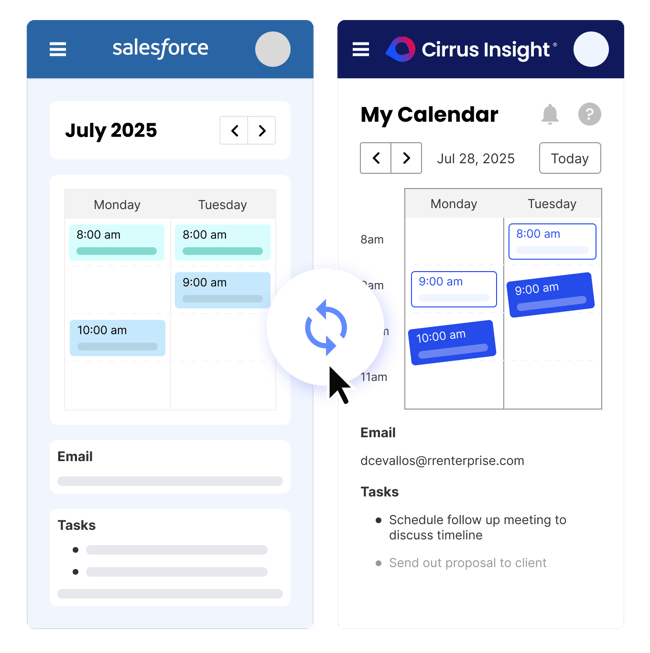
Cirrus Insight: CRM Automation Inside Your Inbox
Most CRM automation tools focus on workflows inside the system. Cirrus Insight focuses on where sales actually happens, the inbox.
Because here’s the reality:
Reps don’t live inside Salesforce.
They live inside Gmail and Outlook.
And when CRM updates depend on reps switching tabs and logging activity manually, data becomes incomplete. Forecasts become unreliable. Follow-ups slip.
Cirrus Insight eliminates that friction by automating CRM activity capture and meeting intelligence directly from the inbox.
What Cirrus Insight Automates
- Automatic Email & Meeting Sync with Salesforce: Every email, calendar event, and activity logs automatically. No copy-paste. No manual entry. Salesforce stays fully updated in real time
- AI-Powered Meeting Summaries: Meeting AI generates structured summaries before and after calls, pulling CRM context automatically and capturing key notes without extra effort
- Automated Task Creation: Follow-ups and next steps can be created automatically based on meeting outcomes and activity triggers
- Email Tracking & Buyer Signals: See when prospects open emails, click links, or engage with attachments. Prioritize high-intent leads using real engagement data
- Smart Scheduler Automation: Route leads to the right rep automatically based on availability, territory, or predefined rules, eliminating back-and-forth scheduling friction
- Sales Cadences: Trigger structured follow-up sequences without manually creating each step, ensuring consistent outreach
The Real Impact on Revenue Teams
When automation happens inside the inbox:
- Manual data entry disappears
- Salesforce records stay 100% up to date
- Forecasting becomes more accurate
- Follow-ups happen faster
- Managers gain true pipeline visibility
- Reps save hours every single week
CRM Automation Tools FAQs
What are CRM automation tools?
CRM automation tools are software solutions that automatically handle repetitive sales and marketing tasks inside a CRM system, such as logging emails, assigning leads, updating deal stages, and triggering follow-ups. They help reduce manual work, improve data accuracy, and accelerate pipeline movement.
What is the difference between CRM and marketing automation tools?
CRM tools primarily manage customer data, deals, and pipeline visibility, while marketing automation tools focus on email campaigns, lead nurturing, and behavioral segmentation. Many modern platforms combine CRM and marketing automation tools to create a unified revenue system.
How do CRM marketing automation tools improve sales productivity?
CRM marketing automation tools improve productivity by automatically scoring leads, triggering email sequences, routing prospects to the right rep, and syncing engagement data into the CRM. This allows sales teams to focus on high-intent prospects instead of manual admin work.
Are CRM automation tools worth it for small businesses?
Yes, CRM automation tools are especially valuable for small teams because they eliminate manual data entry and missed follow-ups. Even basic automation, like automatic email logging and task creation, can save hours per week and improve close rates.
What can you automate inside a CRM?
You can automate lead assignment, follow-up reminders, deal stage updates, email syncing, meeting logging, reporting updates, forecasting inputs, and even customer onboarding workflows. Advanced CRM automation tools also offer AI-powered summaries and engagement tracking.
How do CRM automation tools improve forecasting accuracy?
Automation ensures that all emails, meetings, and tasks are logged automatically, keeping deal records up to date. When CRM data is complete and accurate, pipeline reports and revenue forecasts become significantly more reliable.
What are CRM automation testing tools?
CRM automation testing tools help validate workflows, triggers, and integrations to ensure automation rules function correctly. These tools are commonly used by enterprise teams to prevent errors in large-scale CRM systems.
How does Cirrus Insight support CRM automation?
Cirrus Insight automates email and meeting sync with Salesforce, tracks buyer engagement, creates tasks automatically, and provides AI-powered meeting summaries. By eliminating manual CRM updates inside Gmail or Outlook, it keeps Salesforce 100% up to date while saving reps hours every week.


