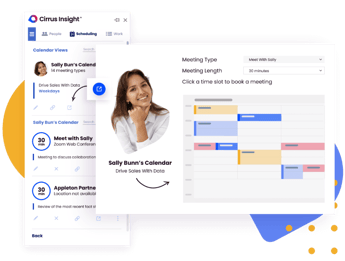
.png?width=18&height=18&name=Vector%20(5).png)




Nobody likes playing email ping-pong to schedule meetings. Not your SDRs and definitely not your clients.
Using appointment scheduling software solves this problem and frees up your sales team's time for high-value sales activity like closing deals, instead of bloated admin tasks like sending up to eight emails to schedule a single meeting.
Online meeting scheduling tools come in all shapes and sizes, each with distinct use cases for different teams, niches, and businesses.
Trying to find the right one for your reps? Skip watching endless product demos with this list of eight of the best online appointment-scheduling software for sales teams.
What Is Online Scheduling Appointment Software?
Online scheduling appointment software is a digital tool that allows customers, prospects, or team members to book meetings automatically based on real-time calendar availability.
For more info, explore our best appointment scheduling app guide.
Instead of manually coordinating availability through back-and-forth emails, appointment scheduling software online syncs calendars, adjusts for time zones, sends automated confirmations, and updates CRM records instantly.
For sales teams, this means:
- Fewer emails
- Shorter sales cycles
- Higher meeting conversion rates
- Better CRM data accuracy
Modern online scheduling appointment software integrates with email platforms, CRMs, video conferencing tools, and routing workflows to eliminate scheduling friction entirely.
Top 9 Online Scheduling Appointment Software for Sales Teams
Choosing the best online scheduling appointment software isn’t just about sharing a calendar link. Sales teams need tools that reduce friction, improve routing accuracy, sync with CRM data, and accelerate pipeline velocity.
Below is an updated breakdown of the top appointment scheduling software online, including who it’s best for, where it excels, and where it may fall short.
1. Cirrus Insight
Free Trial: Yes
Starting Price: $7/month
Key Integrations: Salesforce, Zoom, Google Workspace, Microsoft Outlook
With 4.81 stars on the Salesforce AppExchange, Cirrus Insight has one of the best appointment scheduling tools for sales teams to cut down on back-and-forth email chains.
With Cirrus Insight Calendar Sharing, you can share your real-time availability in your sales emails with a unique calendar link. And the best part? Every activity syncs with Salesforce, updates, changes, and recurring events.
Why It stands out:
- Real-time calendar sharing directly inside Gmail and Outlook
- Automatic Salesforce activity syncing (meetings, updates, changes)
- Smart Scheduler for intelligent lead routing
- Team-based load balancing
- Custom booking workflows and branded forms
- Website embedding via Calendar API
- Custom routing rules based on CRM fields
- One click meeting bookings
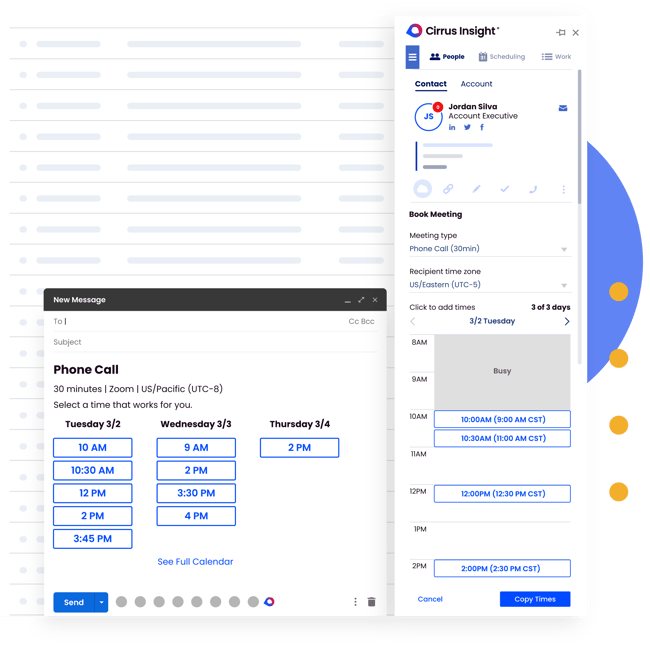
Smart Scheduler intelligently matches leads to the right sales rep based on territory, product line, account ownership, or custom criteria, eliminating manual handoffs and reducing meeting delays.
Best For
Sales teams that need:
- Deep Salesforce integration
- Intelligent lead routing
- Workflow automation
- CRM-accurate scheduling
- Enterprise-level customization
If your team lives in Salesforce, Cirrus Insight turns scheduling into a revenue acceleration engine, not just a booking tool.
2. Calendly
Free Plan: Limited individual use
Starting Price: $16/user/month
Integrations: Salesforce, Microsoft Teams, HubSpot, Zoom, Google Calendar
Calendly is one of the most widely recognized online appointment scheduling software platforms. It offers clean booking pages and simple calendar sharing.
Strengths
- Easy setup
- Clean UI
- Widely adopted
- Good for individual reps
Limitations
- Limited routing intelligence without higher-tier plans
- Less Salesforce-native compared to specialized sales tools
- Designed more for general scheduling than revenue workflows
Best suited for small teams or individual contributors who need straightforward meeting booking.
3. Cal.com
Starting Price: $15/user/month
Integrations: Salesforce, Google Calendar, Microsoft Outlook
Cal.com focuses on flexibility and customization. It offers open-source options and workflow customization.
Strengths
- No-code customization
- Developer-friendly
- Single-use scheduling links
- Strong API capabilities
Limitations
- Requires more setup
- Not purpose-built for sales acceleration
- Routing functionality depends on configuration
Best for teams wanting technical control over booking workflows.
4. 10to8
Free Trial: Yes
Starting Price: $460/year/site
Integrations: Salesforce, Zoom, Microsoft Teams
10to8 allows prospects to view pooled team availability, making it useful for larger groups managing shared calendars.
Strengths
- Pooled scheduling
- Automated reminders
- Booking management interface
Limitations
- Less advanced CRM-based routing
- Pricing structured per site
- Interface less sales-focused
Better suited for service teams or businesses managing shared resources.
5. TimeZest
Free Trial: Yes
Starting Price: $65/month (up to 4 users)
Integrations: Microsoft Outlook, Zoom, ConnectWise
TimeZest is focused on managed service and IT support teams rather than traditional sales organizations.
Strengths
- In-ticket scheduling
- Availability customization
- Efficient for service resolution
Limitations
- Limited CRM-native sales functionality
- Designed more for service efficiency than sales acceleration
Best for MSPs and support-focused organizations.
6. Zoho Bookings
Free Trial: Yes
Starting Price: $6/user/month
Integrations: Salesforce, Google Calendar, Outlook
Zoho Bookings offers an affordable option with payment processing and intake forms.
Strengths
- Budget-friendly
- Custom booking forms
- Mobile-responsive booking pages
Limitations
- Less intelligent routing
- Less sales-focused automation
- Works best within Zoho ecosystem
Ideal for small businesses prioritizing affordability.
7. Apollo.io
Free Trial: Yes
Starting Price: $59/user/month
Integrations: Salesforce, HubSpot, Google Calendar, Outlook
Apollo blends prospecting, enrichment, and scheduling into one platform.
Strengths
- Lead data + scheduling
- CRM syncing
- Built-in prospect intelligence
Limitations
- Higher cost
- Scheduling is secondary to prospecting
- Less workflow customization compared to dedicated schedulers
Best for outbound-heavy sales teams that want prospecting + booking in one tool.
8. HubSpot Meetings
Free Plan: Yes
Starting Price: Free (advanced features require paid HubSpot plans)
Integrations: HubSpot CRM, Google Calendar, Outlook, Zoom
HubSpot Meetings is built directly into HubSpot’s CRM platform, making it a natural choice for teams already using the HubSpot ecosystem.
Strengths
- Native CRM integration
- Automatic contact record updates
- Meeting links embedded in marketing emails
- Built-in reporting within HubSpot
Limitations
- Limited advanced routing without paid plans
- Best suited for HubSpot users
- Less flexible for teams outside the HubSpot ecosystem
Best for: Marketing-driven sales teams already operating inside HubSpot.
9. Chili Piper
Free Trial: No (demo required)
Starting Price: Custom pricing
Integrations: Salesforce, HubSpot, Marketo, Zoom
Chili Piper focuses heavily on inbound lead conversion and intelligent routing. It’s often used by B2B SaaS companies that want to instantly route demo requests to the correct rep.
Strengths
- Advanced lead-to-rep routing
- Instant booking after form submission
- Round-robin and territory-based routing
- Strong inbound conversion optimization
Limitations
- Premium pricing
- More complex setup
- Focused primarily on inbound sales workflows
Best for: High-volume inbound sales teams that want to convert demo requests immediately.
Essential Features of Online Appointment Scheduling Software
Accessibility & Flexibility
Online appointment schedulers should be user-friendly, intuitive and cater to varying technical abilities. This typically includes features like compatibility with screen readers, devices and platforms (email, web and social media) as well as ease of operability.
Appointment schedulers should also be customizable and accommodate different appointment types (1:1s or group meetings with specific people), rescheduling, and cancellations
Time Zone Adjustments
For a business serving global clients, using a scheduling tool with time zone adjustment is important.
Without this feature, clients from other locations may struggle to schedule meetings correctly or might miss them due to confusion. However, with time zone adjustment, meeting details are correctly displayed on your booking pages and on every attendee’s calendar, regardless of their location.
Eliminate Scheduling Friction
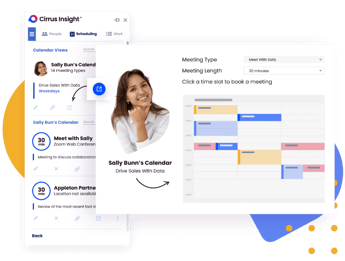
Intelligently match buyers to staff based on personalization criteria, availability and utilization.
Implementing Online Appointment Scheduling Software in Your Sales Process
Tool Compatibility
After picking an online appointment scheduler for your staff needs, check that it seamlessly integrates with your existing sales tools. The last thing you want to do is add a new tool to your tech stack with a learning curve that eats into your sellers’ time.
Ideally, your scheduler should allow for seamless data syncing with your CRM and email platforms and map relevant data fields such as contacts or account records between the tools.
Workflow Alignment
Where does scheduling friction happen the most? After a demo? Before a follow-up call? In emails or landing pages?
Pinpointing where you need to automate or enhance scheduling allows you to integrate new tools that complement your existing workflow. Delays in finding mutually available time slots can prolong the sales cycle and lead to potential loss of interest.
Feature Importance
If you’re looking to pre-qualify leads before a meeting is scheduled, using a scheduling tool with customizable booking fields will save your reps some time. And for making sure a prospect or client speaks to the right sales rep based on specific criteria? A tool like the Cirrus Insight Smart Scheduler would be invaluable.
Discoverability
Make your booking page links and buttons easy to find. Use clear, prominent calls-to-action (CTAs) across your emails, marketing materials, social media, and landing pages.
If there's no clear CTA for prospects to schedule appointments, they may hesitate or overlook the opportunity to engage further. An online appointment scheduler with embedded booking functionality makes for easy access across your sales and prospecting channels.
Automated Hand-offs
Apart from syncing with your CRM and pipeline data, scheduling software automates busy workloads like adding video conferencing links, sending meeting invites, and even follow-up meeting requests, allowing your sales reps to focus on more important sales tasks.
Also, when appointments are rescheduled or canceled, all attendees are automatically notified, keeping everything coordinated and preventing scheduling conflicts.
Choosing the Right Online Scheduling Appointment Software for Sales Teams
In today’s competitive sales environment, speed and simplicity win deals.
If booking a meeting requires multiple emails, manual CRM updates, or internal handoffs, you’re creating friction, and friction slows revenue. The right online scheduling appointment software should eliminate that friction entirely.
Modern sales teams need more than basic calendar sharing. They need scheduling tools that:
- Sync directly with Salesforce in real time
- Automatically log meetings and updates
- Intelligently route leads to the right rep
- Balance bookings across teams
- Embed scheduling into email, web, and inbound workflows
- Reduce manual admin work
Cirrus Insight goes beyond simple appointment scheduling software online by turning scheduling into a revenue acceleration engine.
With Smart Scheduler, teams can automatically match prospects to the right sales rep using CRM-driven criteria and load-balancing rules. Every booking syncs instantly with Salesforce, keeping pipeline data accurate without extra work from reps.
Online Scheduling Appointment Software FAQs
What is online scheduling appointment software?
Online scheduling appointment software allows users to book meetings automatically based on real-time calendar availability without manual coordination.
What is the best online appointment scheduling software for sales teams?
The best online appointment scheduling software for sales teams integrates with your CRM, supports intelligent routing, syncs calendars automatically, and reduces manual data entry.
What is the best free online appointment scheduling software?
The best free online appointment scheduling software depends on your needs, but most free plans offer limited integrations and basic booking features. Growing sales teams often require CRM syncing and workflow automation available in paid plans.
How does appointment scheduling software online improve sales performance?
Appointment scheduling software online reduces booking delays, increases meeting conversion rates, shortens the sales cycle, and ensures accurate CRM records.
Can online scheduling appointment software integrate with Salesforce?
Yes, many advanced tools integrate directly with Salesforce, automatically syncing meetings, contacts, and activity data to maintain accurate pipeline visibility.
How does Cirrus Insight improve online appointment scheduling?
Cirrus Insight enhances online appointment scheduling by syncing meetings directly with Salesforce, enabling intelligent lead routing, balancing team availability, and allowing scheduling directly from Gmail or Outlook.
Does Cirrus Insight support team-based scheduling?
Yes, Cirrus Insight’s Smart Scheduler allows teams to distribute bookings evenly, prioritize specific reps, and create custom routing workflows based on defined criteria.
Eliminate Scheduling Friction
Intelligently match buyers to staff based on personalization criteria, availability and utilization.